Showing posts with label Tool Apps. Show all posts

Tuesday, July 21, 2015

Clean Master Phone Boost Android V5.9.6

Clean Master Phone Boost Android V5.9.6

The World's Most Trusted Android Optimizer, Speed Booster and Free Anti-Virus app, Clean Master Helps Accelerate and Clean Up Over 400 Million Phones! It Also Provides Real-time Protection With the #1 Antivirus Engine, and Secures Your Private Data With the AppLock Function.
Have you ever encounter the following problems?
Your device has become laggy and freezes all the time
You don't have enough space to take more pictures or install apps
Your battery has started draining quicker than ever
Your device overheats and needs to cool down
You want to lock your photos, gallery and messages from prying eyes and nosy friends
Features
AppLock
AppLock can lock Facebook, SMS, Contacts, Gallery, or any other apps you choose. With AppLock, only you can see the photos you protect. Guarding your privacy is easier than ever!
Duplicate Photo Remover
Clean Master can identify similar photos & blurry photos automatically, giving you the choice to keep or delete them. It's just like a gallery doctor for your device.
JUNK FILE CLEANING
The junk-creating behavior of millions of apps has been analyzed so that Clean Master can efficiently hone in on its targets (cache and residual files) with perfect accuracy. Delete cache and residual files to reclaim storage, boost speed and improve the performance of your device and SD card.
MEMORY BOOST
Boost your games and apps, free up memory (RAM), speed up your device and save more battery. Our 1 Tap Boost and Game Boost features make it easy to optimize directly from your homescreen.
CPU COOLER
Cool off your device by finding and stopping the apps that are causing it to overheat and make your battery last longer!
ANTIVIRUS
Ranked #1 by AV-TEST for the seventh time! A professional quality antivirus service scans devices in just 8 seconds, 500% faster than other paid antivirus apps. Scan the system, pre-installed and user-installed apps to keep your device safe from viruses, trojans, vulnerabilities, adware and spyware. Keep your privacy safe by scrubbing personal info from your device.
Game Booster
Automatically improve your game speeds by 30%+ when launching games.
Autostart Manager
Prevent apps from autostarting to speed up your device. (Root needed for this feature)
APP MANAGER

Uninstall unwanted apps or bloatware and back up important ones. Some rooted devices will be able to move apps to the SD card as well as uninstall pre-installed and system apps. Our own Picks section lets you find useful apps that match your interests.

Download Clean Master Phone Boost Android V5.9.6
 

Battery Doctor (Battery Saver) v4.23 APK

Battery Doctor (Battery Saver) v4.23 APK

Over ***330 million*** downloads over Android and iOS worldwide.Battery Doctorthe professional power manageris the best free battery saving app which is capable of extending your battery life.
FEATURES
Accurately estimates battery remaining time
Task Killer that stops apps that drain power while not in use
Unique three-charge cycle that boosts battery life
Widgets that improve battery performance
Accelerates the speed of your device
Indicates how much battery power will be extended if you shut down Bluetooth/Wi-Fi/etc
Gives device software and hardware information
Accurately Estimates Remaining Battery Time
Tells how long battery will last under a variety of situations (playing games, Wi-Fi on or off, etc)
This Smart Saver Defends Your Juice
This essential app does everything battery-related from giving tips of when to charge (and more importantly when not to) to more advanced battery longevity features such as disabling unnecessary apps/hardware that drain power and using our unique three-stage charging system. Battery Doctor efficiently protects your battery conveniently.
Professional Charging

This app regulates the manner in which your device is charged with a three-stage system to ensure you get the most out of your battery and reminds you not to overcharge. It also has features that can monitor and regulate power consumption.

Download Battery Doctor (Battery Saver) v4.23 APK

Saturday, July 11, 2015

Advanced Download Manager Pro Apk 4.1.8

Advanced Download Manager Pro Apk 4.1.8

Powerful Downloader:
- downloading from internet up to three files simultaneously;
- accelerated downloading by using multithreading (9 parts)
- download files in background and resume after failure;
- interception of links from the browser and clipboard;
- boost algorithms for increased speed of downloading;
- loader for images, documents, archives and programs;
- download accelerator for social networking service;
- faster downloader for 2G, 3G and 4G networks;
- downloading only through the internet on Wi-Fi;
- support resuming of interrupted downloads;
- video downloader and music downloader;
- speed up downloading from file-sharing;
- support files larger than 2 gigabyte;
- parallel download files in queue.

Advanced Settings:
- interface customization and themes;
- select the folder for downloaded files;
- save different file types in different folders;
- automatic actions after complete download;
- create an empty file to accelerate downloading;
- autostop downloads if the battery charge level is low;
- auto resume after errors and break of connection;
- import list of links from a text file on SD-card;
- backup list of downloads and settings in file;
- planning start of downloading at right time;
- turbo mode for speed up downloading;
- profiles for each type of connection;
- automatic operation on schedule;
- support quick autoadd download.

Clean Interface:
- material design, left menu with quick options;
- information from downloader: speed, size, time;
- sorting downloads by type, order, size and name;
- context menu for easy management of downloads;
- open completed downloads through favorite apps;
- support pause, resume, restart for downloads;
- creation of advanced profiles for sites;
- fine-tuning for each download;
- widget on home screen.

Extended Notifications:
- icon with progress and speed in notification panel;
- transparent progress-bar on top of all windows;
- completion notification by sound and vibration.

Fast ADM Browser:
- support of multiple tabs;
- list of history and bookmarks;
- easy sending file to downloader;
- download mp3 from popular archives;
- interception of mp4 video from tubes;
- easy downloader for all types of files;
- option "User-Agent" for forgery the browser.

Simple control of the list of downloads:
- press on the download to start/stop the process;
- press on the completed download to open the file;
- long press on download to display the context menu.

Add file in Advanced Download Manager:
- press on link and from window "Complete action using" select ADM Editor;
- long press on a link to display the context menu, press "Share" or "Send" and from window "Share via" select ADM Editor;
- copy link, after program intercept it from clipboard and send in ADM Editor, or use "Add" button and paste the link.

Direct Download


Download Advanced Download Manager Pro Apk 4.1.8


Titanium Backup Pro Apk Cracked 7.0.0.3

Titanium Backup Pro Apk Cracked 7.0.0.3

PRO Features Added:
[] Multiple backups per app
[] 0-click batch restore
[] Backup/restore SMS,MMS,calls,bookmarks,Wi-Fi AP as XML
[] Multi-user support for some apps! (eg: games)
[] Batch verification
[] Backup apps without closing them!
[] Create your own update.zip containing apps+data!
[] Restore individual apps+data from non-root ADB backups!
[] Restore individual apps+data from CWM backups!
[] Restore individual apps+data from TWRP backups!
[] Hypershell speed
[] Migrate system data across different ROMs
[] Market Doctor (relink apps to Market)
[] "Destroy all Market links" feature
[] Apps freezer (incl. batch support)
[] Market "auto updating" manager
[] Convert user apps <=> system apps
[] Encryption
[] Unlimited schedules
[] Sync to/from Dropbox (manual/scheduled)
[] Sync to/from Box (manual/scheduled)
[] Sync to/from Google Drive (manual/scheduled)
[] TB Web Server: download/upload your backups as a single ZIP on your computer
[] Load/Save a Filter and use it in Widgets/Schedules
[] Change the device's Android ID, restore it from a backup or after a factory reset
[] Protect backup against deletion
[] Send backup (to e-mail/cloud) and import it in 1 click
[] Backup→Verify→Un-install an app in one shot
[] Freeze/defrost/launch apps in a single click
[] CSV export any app DB (e-mail or Google Docs)
[] Brand the app with your name
[] Bloatware Melter (experimental)
[] Convert app data to/from faster WAL DB format
[] And more!
More Memory:
[] Dalvik cache cleaner
[] Integrate system app updates into ROM
[] Move apps into ROM
[] Integrate Dalvik cache system elements into ROM
What the Press says:
"The Most Essential App For Android" - Tech'n'Life
"NONE can compare with this one" - Android Market Review
"The Best Backup App for Android" - Lifehacker
"The hands down best Backup on the market" - Absolutely Android
"It is a must-have backup app" - Droid Ninja

Direct Download


Download Titanium Backup Pro Apk Cracked 7.0.0.3


Sunday, July 5, 2015

Automatic Call Recorder PRO v4.23 APK [Latest]+[Updated]

Automatic Call Recorder PRO v4.23 APK [Latest]+[Updated]

Record any phone call you want and choose which calls you want to save. You can set which calls are recorded and which are ignored. Listen to the recording, add notes and share it. Integration with Google Drive™ and Dropbox allows calls to be saved and synchronized to the cloud as well.
Google Drive integration works on Android versions 3.0 and above.
Please note that call recording does not work on certain handsets and can result in inferior quality recordings. We therefore suggest that you try the free version before purchasing the paid app.
If you encounter any recording issues or wish to improve voice quality, try recording from a different audio source, or use auto-on speaker mode.
Recorded calls are stored in the Inbox. You can change the destination recordings folder to an external SD card as well. You can set the size of the inbox. The number of saved calls is limited only by your device memory. If you decide that a conversation is important, save it and it will be stored in the Saved Calls folder. If not, old recordings will automatically be deleted when new calls fill up the inbox.
You can enable a Call Summary Menu with options to appear immediately after a call.
Search for recordings by contact, phone number, or note.
There are 3 default settings for automatic recording:
Record everything (default) – This setting records all calls except for contacts pre-selected to be ignored.
Ignore everything – This setting records no calls except for contacts pre-selected to be recorded.
Ignore contacts – This setting records all calls with people who are not contacts, except for contacts pre-selected to be recorded.

In the Pro version only: You can set calls from particular contacts to be automatically saved, and they will be saved in the cloud.


Download Automatic Call Recorder PRO v4.23 APK

Sunday, June 21, 2015

5 Best Android benchmark tools

5 Best Android benchmark tools

AnTuTu Benchmark

AnTuTu benchmark is the most popular Android smartphone and tablet benchmarking app in the world!.
Over 100,000,000 users
Benchmark app used during Google I/O 2014
No.1 benchmark app, used as an industry standard by leading technology companies and hardware review sites.
With the Click and Go test suite, Antutu will comprehensively test all aspects of a device, including UX, GPU, RAM, CPU, I/O and more. Each item is individually assessed and given a score. These scores can be uploaded to the Antutu database, and then used to rank your device among all other Android devices.
Benchmark Items:
User Experience (UX) – Overall device performance with detailed scores.
CPU Tests – Measures the power of the CPU, and gives hard numbers for its actual performance.
CPU Single Test-- Measures the power of CPU by running CPU single test algorithms.
RAM Tests – Investigate the real processing capability of the RAM.
GPU Tests – Measure the performance of real graphics processing, 3D effects, games, and video playing.
I/O Tests – A direct score that reflects on the actual input/output (I/O) performance your system permits.
The Antutu benchmark score of your device is mainly defined by your hardware configuration, but can also be influenced by other elements, including system mode, current device temperature, running apps and more. The score may be vary slightly every time you test.


Vellamo Mobile Benchmark

Vellamo 3.1 is designed to be an accurate, easy-to-use suite of system-level benchmarks for devices based on Android 4.0 forward. In Vellamo we want to enable performance enthusiasts to really understand their system, and how it compares to other systems, and our mission has just begun.
Vellamo began as a mobile web benchmarking tool that today has expanded to include three primary Chapters. The Browser Chapter evaluates mobile web browser performance, the Multicore Chapter measures the synergy of multiple CPU cores, and the Metal Chapter measures the single core CPU subsystem performance of mobile processors.


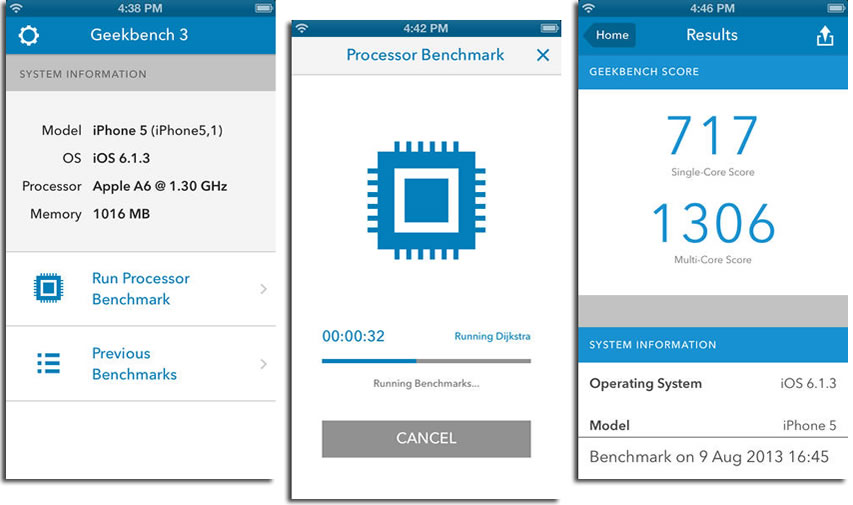
Geekbench 3

Find out how fast your Android device is with Geekbench 3, the popular cross-platform benchmark.

Geekbench 3 includes several new tests designed to simulate real-world scenarios. These new tests are designed to quickly and accurately measure mobile processor performance.
Every test included with Geekbench 3 is multi-core aware. This allows Geekbench 3 to measure the full potential of your device's processor. Geekbench 3 also reports performance as separate single-core and multi-core scores, making it easier to figure out how your device will handle your apps.


GFXBench GL Benchmark 3.0

GFXBench is a free, cross-platform and cross-API 3D graphics benchmark that measures graphics performance, long-term performance stability, render quality and power consumption with a single, easy-to-use application.
GFXBench 3.0 adds advanced OpenGL ES 3-features and new special tests to the popular GFXBench 3D graphics benchmark.
New features:
Manhattan test: GPU-intensive OpenGL ES 3 test using advanced API-features for testing the latest high-end mobile devices (Features: multiple render target for deferred rendering, geometry instancing and transform feedback, etc.)
Battery and Stability test: Measures the device’s battery life and performance stability by logging frames-per-second (FPS) and expected battery running while running sustained game-like animations (the T-Rex scene).
Render quality test: Measures the visual fidelity provided by the device in the high-end gaming-like scene
Fully redesigned, multi-lingual, easy-to-use user interface: device comparison within the application by downloading the complete GFXBench database, extensive system information
Please note: The benchmark needs at least 300 MB free space on the device.


3DMark Ice Storm Benchmark

Benchmark your Android smartphone and tablet with 3DMark, then compare its performance with more than 2500 other devices. You can even compare your Android benchmark test scores with phones and tablets running iOS, Windows and Windows RT.

3DMark - The Gamer's Benchmark
3DMark is a graphics benchmark used by millions of people, hundreds of hardware review sites and many of the world's leading technology companies. It's the industry standard gaming performance benchmark, a professional-grade testing tool available to you for free.
• The world's most popular benchmark test since 1997.
• Developed by Futuremark, the benchmark experts.
• Test your device's GPU and CPU performance.
• Compare the fastest Android, iOS, Windows and Windows RT devices.
• 100% free. No ads. No in-app purchases. No restrictions.

Accurate and impartial benchmark tests
Use 3DMark Ice Storm for device-to-device comparisons of mainstream mobile devices. Ice Storm is an OpenGL ES 2.0 benchmark test that uses fixed off-screen rendering at 720p then scales the output to fit the native display resolution of your device. Ice Storm includes two graphics tests designed to stress the GPU performance of your device and a physics test to stress its CPU performance.
Use 3DMark Ice Storm Extreme for device-to-device comparisons of high performance mobile devices. Ice Storm Extreme raises the off-screen rendering resolution to 1080p and uses higher quality textures and post-processing effects in the graphics tests to create a more demanding load for the latest smartphones and tablets.
Use 3DMark Ice Storm Unlimited for chip-to-chip comparisons of the hardware inside your device without vertical sync, display resolution scaling and other operating system factors affecting the result. In Unlimited mode the rendering engine uses a fixed time step between frames and renders exactly the same frames in every run on every device. The frames are rendered in 720p resolution "offscreen" while the display is updated with small frame thumbnails every 100 frames to show progress.


Saturday, June 20, 2015

Different ways to Play Android games on windows XP/7/8

Different ways to Play Android games on windows XP/7/8

Using Bluestack


Bluestack is a free Android emulator and it can be installed both on Windows and MAC operating system. Installing BlueStacks is simple enough. You can download the files from Android official GOOGLE PLAY store and install apps on it. You can also install apps from other Android markets using this bluestack.

Download App Player and install. 

The first time you use BlueStacks you’ll be asked to allow App Store use, and to provide your Google Account details. Don’t worry, it’s safe to do that here. If you have two-step authentication enabled you’ll need to enter the code Google sends your trusted device when you enable the app store, and again to enable app linking.
You’ll then get an email telling you that you’ve had a new sign-in from a Samsung Galaxy Note 3, which is the specific Android device that BlueStacks emulates.


Using LIVE ANDROID


LIVE ANDROID is completely different from the above mentioned Emulators, ANDROID live is nothing but of a complete operating system which can be installed in your computer or lap top. You can install then on your virtual machines on virtual box and it will act as new operating system. You can download this from he given link below and start using it.

Download the LIVE ANDROID

Using Android SDK


This is the official emulator and this is used for by the Android app developers to test the apps instantly, even you can install any sort of apps on your windows machine using this Android SDK.

Download the Android SDK

Using Youwave


Youwave also works fine to play Android games on your PC, but this is not available for free, Youwave is a paid emulator.

Download the Youwave

Using google chrome

There’s another option: ARC Welder. It’s aimed more at developers than casual users right now and you’ll probably encounter issues with apps that haven’t been optimized for it, but hey! It’s free, and it might work. ARC Welder puts an app runtime inside Chrome on Windows, OS X and Linux, and all you need to do is install it and grab the appropriate APK file for the app or game you want to use.

Thursday, June 18, 2015

Root Explorer v3.3.5

Root Explorer v3.3.5

Root Explorer is the ultimate file manager for root users. Access the whole of android's file system (including the elusive data folder!).
Features include multiple tabs, Google Drive, Box, Dropbox and network (SMB) support, SQLite database viewer, Text Editor, create and extract zip or tar/gzip files, extract rar archives, multi-select, execute scripts, search, remount, permissions, bookmarks, send files (via email, bluetooth etc), image thumbnails, APK binary XML viewer, change file owner/group, create symbolic link, "Open With" facility, MD5, create shortcuts.


Full network access - Required for network and cloud access. No information is passed to us over the internet.
Add or remove accounts - Used by the Google Drive SDK to add a new account if desired. No changes are made to existing accounts and no details accessed apart from the account name.
Find accounts on the device - Used to list available accounts for logging into Google Drive.
Prevent from sleeping - Used to stop the device sleeping during long operations so they are not interrupted.


Download Root Explorer v3.3.5 [2.18MB] [zip]