Lenovo Yoga Tablet 2 Pro review The Lenovo Yoga Tablet 2 Pro is naturally a bigger version of the Yoga Tablet 2. Things don’t just end with a bigger screen – 13.3-inch as opposed to 10.1-inch – but Lenovo has managed to it in a projector in the Tablet 2 Pro. Yes, you read that right – a Projector. This makes it...
Holographic Projection Technology...A amazing way to see...!!
If heard about hologhraphic projection then you are about to enter in new era of its application.
Holographic projection is not now a sifi story...just like in movies peoples are present in front of you virtually....not really. they seem to be there bt exactly they are not...their 3d image is in front of us.
now holographic projection is not a sifi thing.it is in real...in dubai they are advertising it in shopping malls.
when we think about its application there is one thing come in mind can it be too much handy to carry in our hands,or can we see people virtually in front of us at home or at television,during video calls..
yes it can be in future,but for now its in limited hands,...
When we talk
about PSP's the first thing which usually comes in our mind is excitement and
entertainment which the PSP brings to us. PSP's are among the best compact
gaming consoles which SONY has ever made. When we eventually go out for an
outing or any trip the PSP's are our best companions. But now the scenario has
changed a lot. At present the world has been dominated by Smartphones and
phablets and it has eventually become impossible for us to carry both the
Smartphones and the PSP all together in our pockets. This raises a big question
in front of us that, "Is it possible to play PSP games on Android device
"? YES it can be done, as let me remind you that we all are living is the
modern era and everything is possible here.
Play PSP
Games on Android
To play PSP
games on Android all you will need to do is follow these simple steps
1. To play
PSP games on Android the first thing which you would need is to download a PSP
Emulator on your Android device.
2. For this
go to the Google Play Store and in the search box type PSP Emulator. You would
be displayed with thousands of result but you should download the PPSSPP - PSP
Emulator as it is the most trusted and the best PSP Emulator.
3. After the
PPSSPP Emulator gets installed now you would need to download the game file of
the game which you want to play. These game files are usually in ISO or CSO
file formats.
4. You can
download your game file from PSPSHARE save it on any location on your Android
device and open PPSSPP Emulator and select LOAD and open your game file by
browsing into the location where you have saved your game file and enjoy.
5. In most
of the cases you will observe that because of large file sizes the PSP games
files are generally splited into 7 or 8 ISO or CSO parts. In this case it
becomes a big ques how to merge these 7 or 8 ISO or CSO game files to get a
single game file.
6. For
merging files you will need to download the HJ FILE SPLIT on your PC and then
after the HJ FILE SPLIT gets downloaded open it and browse all the games files
and select combine. After a minute you would get a single ISO or CSO game file.
CLICK HERE
TO DOWNLOAD HJ FILE SPLIT
7. Move this
single game file on your Android device and now open the PPSSPP Emulator and
select LOAD and browse in to the location where you have saved your merged game
file open it and now you can enjoy your favorite PSP game on your Android
device.
Mobile phone or even has the prices vary widely ranging
from the cheapest phones in the world up to the most expensive mobile phone in
the world. In today’s society, there aren’t many things that people are more
attached to than their mobile phones. A person’s cell phone is his gateway into
everything that goes on in his life. With the recent advances in technology, it
now seems as if your cell phone can do everything that your computer can do. It
then comes as no surprise that your cell phone could cost as much as it does.
If you’re in the market for a phone that will do nearly everything, then you
should expect to pay a lot of money. Here is a list of world’s top 10 most
expensive mobile phones.
10. Vertu Signature Diamond
Exclusive luxury phones from Vertu. Vertu is very famous
for its luxury mobile phone products, including mobile phones Vertu Signature
Diamond is included in order to-10 list of the world’s most expensive mobile
phones. This phone is made of platinum and claimed the best assembly process is
done by hand, not machines. Phone decorated with a pretty fancy diamonds
produced only 200 pieces. The price of this phone is $ 88,000.
9. iPhone Princess Plus
iPhone Princess Plus has a feature that is not much
different from other Apple iPhone mobile phone, which makes this into the top
10 most expensive mobile phones in the
world. This iPhone is designed by famous designer
Austria, Peter Aloisson. Beside the gold, this special iPhone flavour comes
with no less than 138 princess cut and 180 brilliant cut diamonds with a weight
of 16.50 – 17.75. And according to Peter Aloisson, the diamonds have the best
quality, so owning such a device is quite a remarkable thing. It’s price is $
176.400.
8. BlackDiamond VIPN Smartphone
At no. 8 in the world’s most expensive mobile phone is
Sony Ericsson’s Black Diamond. Jaren Goh created this stylish concept for Sony.
It features mirror detailing, polycarbonate mirror and an organic LED
technology. Of course, when it comes to Sony, nobody can challenge the screen
results. It is decorated with two diamonds, one on the navigation buttons and
the other in the back of the phone. The price of this phone is $300,000.
7. Vertu Signature Cobra
Vertu Signature Cobra ranks seven of the world’s most
expensive mobile phone. The designs are quite exclusive with the existence of
forms such as the Cobra snake on the phone side. Designed by French jeweller,
Boucheron, the ritzy phone features one pear-cut diamond, one round white
diamond, two emerald eyes, and 439 rubies.
6. Gresso Luxor Las Vegas Jackpot
This phone comes from a traditional purveyor of a luxury
handsets – Gresso, and is called Luxor Las Vegas Jackpot. This phone was
established in Switzerland in2005. It is made of solid gold weighing 180 grams.
The back panel is made up of African backwoods that is more than 200 years old.
That wood is the most expensive wood in the world. Its keys are made of
sapphire crystal. And it costs a cool $1 million.
5. Diamond Crypto Smartphone
Based on Windows CE, this smart phone was designed by
luxury accessories maker Peter Aloisson. This unique object de art is priced at
a crisp $1.3 million and is tagged as the costliest in the world. This one
features a cover adorned with 50 diamonds, 10 of which are the rare blue ones.
Apart from this, it also features s few sections made in
rose gold as well. It also gives protection against
kidnapping and technological blackmail.
4. GoldVish Le Million
Goldvish “Le million” is designed by renowned designer
Emmanuel Gueit, who designed lots of luxury watches and jewellery. The most
luxurious and expensive mobile phone, “Le Million” Piece Unique, had launched
in Switzerland. This phone awarded by Guinness World Records as the world’s
most expensive mobile phones sold in the Millionaire Fair in Cannes, France in
September 2006. Often referred to as the world’s most expensive phone at $1.3
million, this designer phone is bejewelled with 18k white gold and 20 carats of
VVS1 diamonds.
3. iPhone 3G King’s Button
For the third most expensive mobile phone in the world is
still occupied by a variant of the iPhone, named King’s Button iPhone 3G. The
renowned jeweler from Austria Peter Aloisson is the creater of this phone. 138
diamonds are installed on this phone that makes it worth $2.4 million. The
beautiful white diamon of 6.6 carats serves as the home screen button which
enhances the beauty of this phone.
2. Supreme Goldstriker iPhone 3G 32GB
For the second most expensive mobile phone in the world,
a variant of the iPhone from Apple, the Supreme iPhone 3G is priced at $
3,200,000. The iPhone 3GS Supreme features a casing made from 271 grams of
solid 22k gold and a screen trimmed with fifty-three 1-carat diamonds. The home
button is covered with a single rare 7.1-carat diamond. That’s not all,
though—the iPhone 3GS Supreme comes in a chest carved from a single block of
granite and sports Kashmir gold and an interior lining made with nubuck
top-grain leather.
1. Diamond Rose iPhone 4 32GB
The world’s most expensive iPhone to date is the 32 GB
iPhone 4 Diamond Rose by Stuart Hughes. With a price of about $8 million the
phone’s bezel is made of rose and approximately 500 individual flawless
diamonds that total over 100ct. The back is also rose gold and features the
Apple logo all decked out with 53 additional diamonds, while the front
navigation button is platinum with interchangeable single cut 7.4ct pink or
rare 8ct Flawless diamonds in the center.
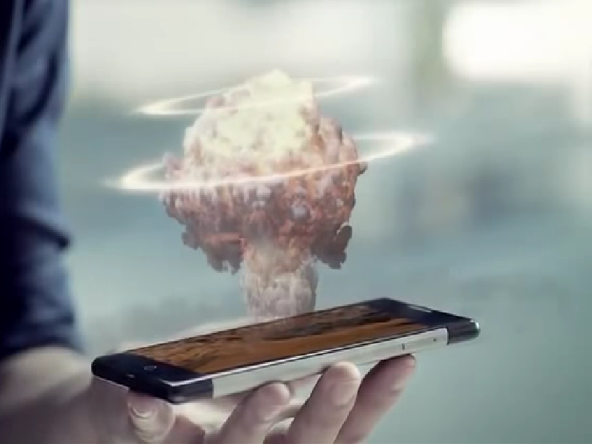
You need to have a look at this smartphone by a
manufacturer from China which is the world’s first holographic image producing
phone. Takee smartphone by Estar claims to be the only smartphone in the market
that can produce stereoscopic 3D holographic images in accordance with the
user’s eye movement. It has four front-facing cameras that produce the 3D
holographic image and then you can interact with them for various actions like
pinch to
zoom or wave of the hand to shift to the next slide.
On the back too, the smartphone is loaded with
two cameras which allow you to 3D print scanned images. Talking about the
technical specifications, this phone has a 5.5-inch 1080p screen, 2GHz
octa-core MediaTek processor, 2GB RAM, 32GB memory, 13-megapixel camera and
2,500mAh battery to power the smartphone for all its fancy visual 3D magic.
Estar Takee smartphone was launched a couple of
days ago in Beijing, China and although the video below suggests that it is a
holographic smartphone, it still looks like these visuals are animated.
Although, it is sure that Takee smartphone is the world’s only holographic
smartphone that is going to turn some heads if it is anywhere near to what is
shown in the official release video.
The holographic smartphone is up for preorders
until the 15th of August within China, but unfortunately they have not made
announcements on the other markets. Whether it will make its way into US shores
will be the big challenge that the chief technology officer Patrick Kwok and
his team will have to take on.
Will this mark the next generation of
communications technology? We can only leave time to tell over the product
launch results. Jarvis will be more than excited to have this for Tony.
You can run XP on your device and this technique will surely impress your friends. For doing this project you need
certain things to be done which are given below and the other thing is that if
your phone is rooted then this is not going to work and if your phone lags due
to low RAM ie, less than 500MB then you don't need to run it because it is
going to make your system very slow.
First create a blank image file in
Bochs on your PC and for that what you have to do is that go to Start and open
up Bochs> and then Disk image creation tool and then the new tab with black
screen appears as shown below.
In that you have to type hd and press
enter and after that it go to the next line here you have to type flat and it
will ask the size. Here you have to type 1500 and then type in c.img and then
press the enter key.
Next thing is that you have to install
Windows XP on blank .img file using Qemu manager, then open up the Qemu manager
the screen shot of which is given below.
After opening up the Qemu manager,
click on the VM on the top left side and select new virtual machine. Its
screenshot of it can be seen above. Then a sub tab appears as shown in the
image and type out any name that you need in the first box and hit next.
Now in
the new tab you can locate the desired RAM that you want to change and change
it to 1 Giga hertz and hit finish. Now what you want to do is install XP to
your blank image file. So what you want to do is click on drives on the left
top side and find out the c.img file from the drives. Usually the c.img file
will be seen at the C drive> Program files > flash > and change view
to all files and your c.img file will be seen select the file and click Okay.
Next thing you have to do is find out
the Window XP.iso file and click Ok. If you don't have iso file then you need
to download a software called Poweriso and by the process given in this article
you can convert it to ISO file. After selecting the iso file click on the run
button on the top left side which is of green color and the system changes to a
blue screen, the image is given below.
After changing the screen to blue
color and loading would take about 45 minutes or about an hour depending on how
fast your computer is and right now it will be running on a virtual machine.
Wait till the loading finishes and after that start the installation and a
couple of options comes out choose from. Choose ntfs file system and then the
installation will take place and it will take few minutes to complete.
When the installation is finished, the
next thing you have to do is that you have to stop the virtual machine, for
that press the red button on the top left and click Ok. And then you have to
find the c.img file and transfer it to phone. For that find out the c.img file
from the local disk as mentioned above and copy the file and paste the file in
the SDL folder on the SD card. And after that go to the link I have given below
and copy the text with code given and paste it in the boch.txt file in the SDL
folder on the SD card.
The next thing you have to do is turn
on your phone and take out the application Bosh which has been installed on
your device and everything will run pretty nice in landscape mode and one thing
you must remember is that it will be not as fast as your personal computer and
you need a lot of patience for the loading to finish for the first time. After
loading is finished you may be in a black display screen for a little bit time
and there you must wait for few minutes and then you can run XP on your Android
device. Actually it takes about nearly 10 minutes to load up XP on the Android
device. After starting up XP on Android you can do anything on it and you can
move the curser by scrolling on the screen.




.jpg)


